HyperX Alloy Core RGB – Gaming
By HyperX · Mechanical Keyboards · Home & Workspace
- Membrane switches, 2 mm actuation and 3.8 mm total travel
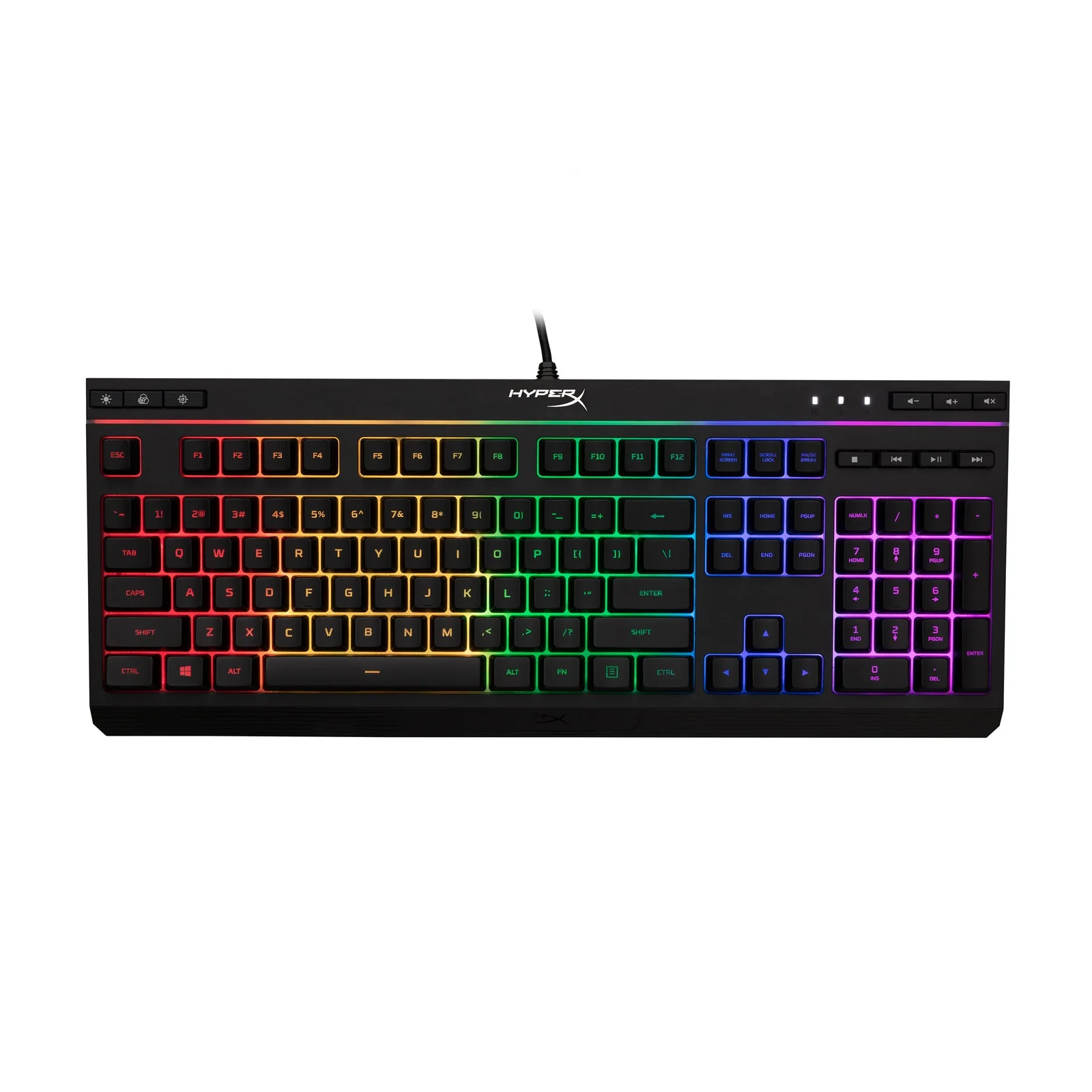
- RGB with 5-zone multi-color customization and 6 LED modes at 3 brightness levels
- 1000 Hz polling rate
- Spill resistant, tested to withstand 120 ml of liquid
- 443.2 mm x 175.31 mm x 35.68 mm
Lowest price seen
~$39.99 (approx.)
from $39.99 at Amazon
- Amazon ~$39.99 (approx.)View at Amazon
- HyperXView at HyperX
- eBay (used) eBay: used, open-box, refurbishedView at eBay (used)
- eBayView at eBay
Prices are snapshots. Check the current price with the store.
Summary
A budget full-size membrane gaming keyboard with 5-zone RGB, dedicated media controls and 1000 Hz polling, aimed at casual gamers and office users who want lighting and a full-size layout for little money. The switches are rubber dome, not mechanical, so if you want fast, crisp response in competitive games, look elsewhere.
Strengths
- 5-zone RGB and the light bar are the most-praised part in owner reviews.
- Quiet, comfortable keys work for typing as well as casual gaming.
- Spill resistance rated to 120 ml handles the odd knocked-over drink.
- Dedicated media buttons and a Game Mode key are convenient.
- Full-size layout with a 2-year warranty at a budget price.
- 1000 Hz polling and multi-key anti-ghosting on paper match gaming boards.
Weaknesses
- Rubber dome switches with high pre-travel feel unresponsive in fast games.
- Independent testers rate it poor for gaming, though one calls it decent for office typing.
- No NGENUITY support, so no firmware updates, macro programming or advanced lighting.
- Lighting is 5-zone, not per-key, and there is no onboard memory for profiles.
- The USB cable is attached, so a cable failure means replacing the keyboard.
- Owners report USB detection failures and dim blue or dead white LEDs over time.
Verified specifications
| Model | HyperX Alloy Core RGB Gaming Keyboard, US layout (part numbers 4P4F5AA / HX-KB5ME2-US). |
|---|---|
| Switches | membrane (rubber dome), not mechanical. |
| Actuation point | 2 mm. |
| Total travel | 3.8 mm. |
| Operation force | 45 g. |
| Backlight | 5-zone RGB, 6 LED modes and 3 brightness levels. |
| Polling rate | 1000 Hz. |
| Anti-ghosting | multi-key. |
| Controls | dedicated media buttons, a Game Mode key that disables the Windows key, and a keyboard lock key. |
| Spill resistance | tested to 120 ml of liquid. |
| Connection | attached braided USB 2.0 cable, 1.8 m (5.9 ft). |
| Compatibility | Windows 10, 8.1, 8 and 7 on PC; console support for PS5, PS4, Xbox Series X|S and Xbox One. |
| Life span | 80 million keystrokes. |
| Form factor | full size. |
| Dimensions | 17.4 × 6.9 × 1.4 in (443.20 × 175.31 × 35.68 mm). |
| Weight | 1121 g (2.47 lb) with the cable. |
| Frame | reinforced plastic. |
| In the box | keyboard and Quick Start Guide. |
| Warranty | 2 years. |
Full research notes and sources
Switches and gaming feel
The Alloy Core RGB uses rubber dome switches, not mechanical ones. RTINGS called it “a poor keyboard for gaming” because the keys have a high pre-travel distance that feels unresponsive, but found it “decent for office use” thanks to a low actuation force that shouldn’t cause fatigue. WePC called it “a mixed bag” with “decent value” but said it falls short of gaming boards. The 2 mm actuation point and 3.8 mm total travel look ordinary on paper; it is the dome action, not the numbers, that sets the feel apart from a mechanical keyboard.
Lighting and software
Lighting is 5-zone RGB, not per-key, with 6 modes (Color Cycle, Spectrum Wave, Breathing, Solid, 5 Zones, Aurora) and 3 brightness levels. You switch modes with onboard buttons — a brightness key, an LED-mode key and FN+arrow combinations — because the keyboard is not compatible with HyperX NGENUITY. There is no onboard memory for profiles, so your lighting may not follow the keyboard to another system, and there are no firmware updates or macro programming. It also has no dedicated macro keys.
Reliability and upkeep
Membrane keyboards are not repairable at the switch level, and the 1.8 m cable is permanently attached, so a cable failure means replacing the whole board. Spill resistance is rated to 120 ml, which covers the occasional knocked-over glass. Long-term owner reports are mixed: two Microsoft Q&A threads describe USB detection failures — one keyboard dropping out on port after port with Error 43 until it became undetectable, another going dead after about 1.5 years — and one r/HyperX owner reported the blue backlight going dim and white quitting. These are isolated posts, not a failure rate, so treat them as a reliability signal rather than a defect count.
Is it worth it?
HyperX lists the Alloy Core RGB at $54.99 MSRP, and HP has sold it at $39.99, a $15 discount. At $39.99–$54.99 it is a fair buy for casual gaming or office use where RGB and a full-size layout matter more than switch feel. If gaming response is the priority, mechanical boards run about $50–$80, with per-key RGB and detachable cables in the $60–$100 band; HyperX’s own Alloy Origins Core is $79.99. Above $55 this board loses its main argument, which is price.
Which model this is
This page covers the HyperX Alloy Core RGB Gaming Keyboard, US layout, part number 4P4F5AA (also sold as HX-KB5ME2-US). The US listing is ASIN B08LWZKT3K. It is not the mechanical Alloy FPS RGB, Alloy Elite RGB, Alloy Origins or Alloy Origins Core, which use different switches and form factors. The 5-zone lighting is not per-key, and the board is not hot-swappable.
Sources
Manufacturer:
Independent reviews:
Owner reports:
- Best Buy customer reviews
- Keyboard stops working on USB ports sequentially (Microsoft Q&A)
- Keyboard not detectable over USB (Microsoft Q&A)
- Has anyone tried the Alloy Core RGB? (r/keyboards)
- RGB color degradation report (r/HyperX)
- Is the Alloy Core RGB hot-swappable? (r/HyperX)
- Alloy Core RGB software (r/HyperX)
- Changing the static colour (r/HyperX)